

One continuous workflow on the device already in your hand.
Free. Private. Be ready when the next doc arrives.
Sign it. Send it back. Get on with your day.
Understand, fill, sign, and return documents from your iPhone or iPad. No account. No subscription. No SignBack server upload.
 See what SignBack saves
INCOMING
Fast Fill found fill spots
Signed PDF ready
SENT BACK
Free to useNo subscriptions or fees
Start immediatelyNo account required
On-deviceDocument processing
CleanNo watermark
The everyday payoff
Save time and money on every document.
SignBack makes paperwork quicker and gives you premium signing tools without subscriptions, fees, or feature limits.
Premium featuresAt no cost
A great signing app, without the paywall.
Fast Fill, on-device summaries, reusable signatures, identities, templates, scanning, and unlimited documents are free to use.
Works with Apple Intelligence technology
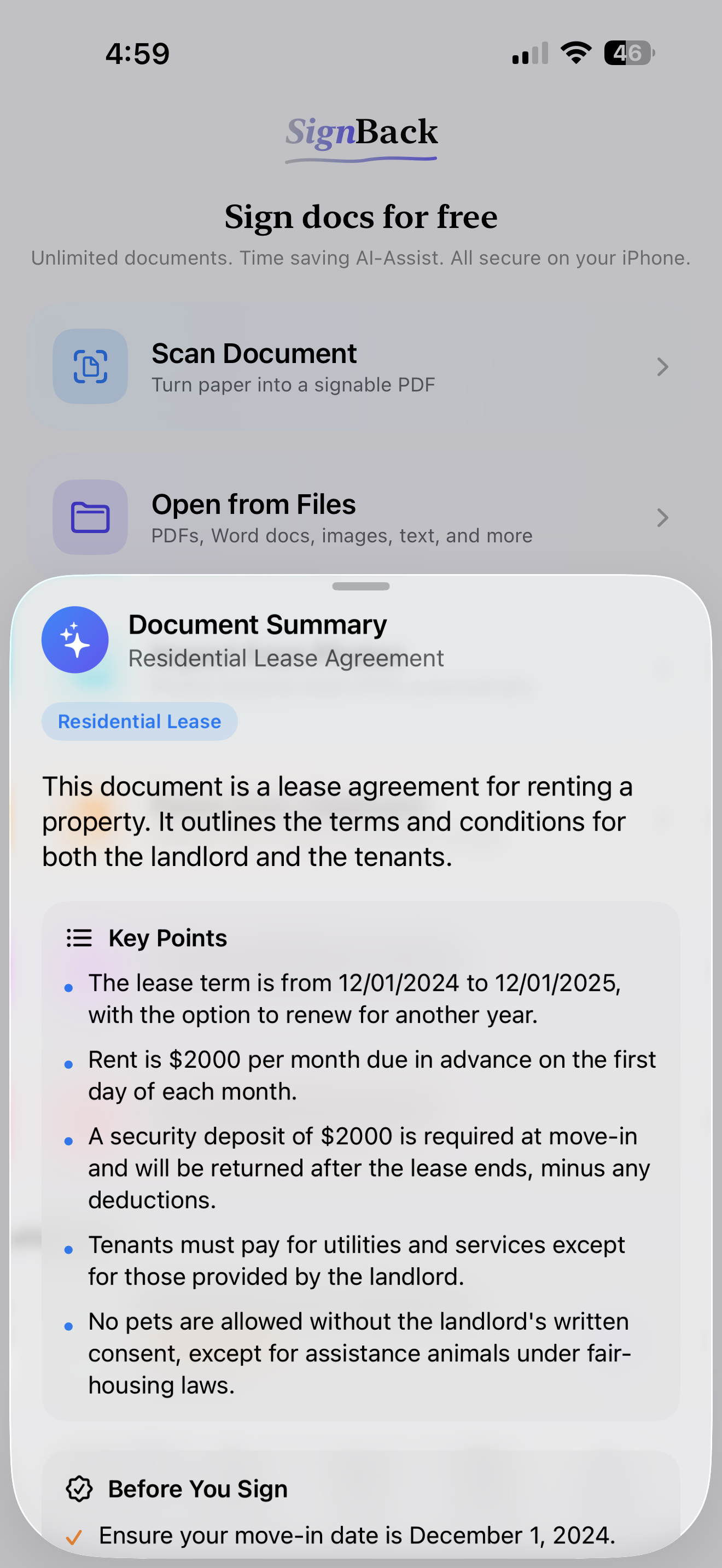
Read less. Know more. Sign sooner.
On supported iPhone and iPad models, SignBack can use Apple Intelligence technology to summarize a document, pull out key points, and surface items to review before you sign. You get useful context without sending the document to a SignBack server.
- 01See what the document is about.
- 02See key points to review yourself.
- 03Move from reading to signing faster.
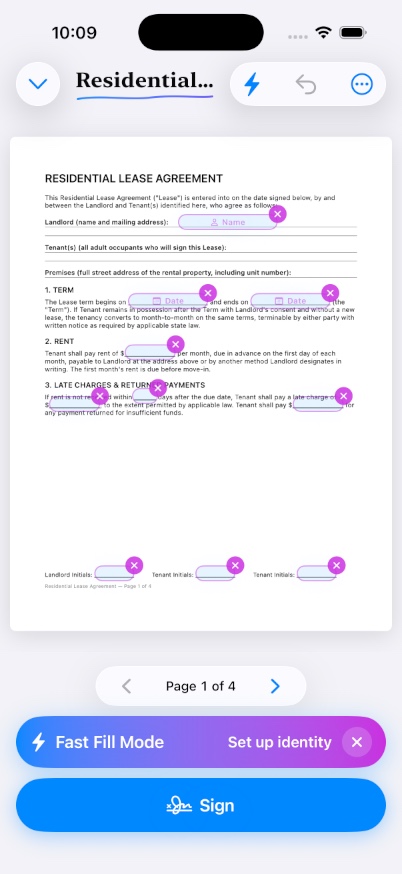
Fast FillLikely fields highlighted
Fast Fill
Stop hunting through the fine print for every blank.
Fast Fill helps find common names, dates, initials, signatures, addresses, checkmarks, and text fields. Tap through the form, use saved details, and finish the job.
01Find common blanks
See likely fill spots across the document.
02Reuse what is yours
Keep signatures, initials, and identity details ready.
03Export it clean
Flatten and share a finished PDF with no watermark.
For landlords and property owners
Property paperwork simplified: scan, sign, and return faster.
Leases, addenda, vendor contracts, disclosures, and property paperwork, from received to signed in one quick flow.
Leases, addenda, W-9s, disclosures, vendor forms, and notices.
Sign as an individual, LLC manager, trustee, agent, or property manager.
Use summaries, Fast Fill, saved details, signatures, and templates.
Share a clean, signed document from the standard iOS share sheet.
Identities
The right signature, in the right capacity.
John Hancock had property to manage, not just a famous signature. Keep personal, LLC, trust, and management identities ready for the role each document requires.
Current identityJohn HancockIndividual
Switch toBeacon Hill Holdings LLCLLC Manager
Switch toLiberty Wharf TrustTrustee
Switch toIndependence Property ServicesProperty Manager
Private by design
Your paperwork stays on your side of the screen.
Documents, signatures, identities, templates, OCR, and Fast Fill analysis are processed locally. Files leave SignBack only when you choose to export, save, or share them.
 Your device
The short version
No catches hiding in the margins.
Is SignBack really free?
Yes. There are no subscriptions, trials, watermarks, account requirements, or document-per-month limits.
Does SignBack upload my documents?
No SignBack server upload is required for core signing. Files may still be included in iCloud Backup, iCloud Drive, Files, Mail, Messages, or another destination if you enable those services or choose to save, export, or share there.
What files can I open?
PDFs, photos, scans, Word documents, Pages files, text, rich text, HTML, CSV, and markdown. Supported files convert to PDFs on-device.
Does it replace an enterprise eSignature platform?
No. SignBack is built for personally filling, signing, flattening, and returning documents, not enterprise routing or server-based audit trails.
Available for iPhone and iPad
Your next document is arriving soon.
Be ready to scan, sign, and send it back without spending another minute or another dollar more than you need to.